Introducing Agent Canvas: From Coding Agents to Org-wide Automation
Written by
Olivia Greene
Published on
Agent Canvas is OpenHands' workspace for creating automations that integrate with Slack, GitHub, and the tools where engineering work happens. Build self-hostable automations for coding agents across local, VM, cloud, and enterprise backends.
AI coding agents are now part of how developers work. They can fix bugs, explain code, write tests, review pull requests, update docs, and help move work forward across the SDLC. But most developers are still prompting their agents by hand, doing one thing at a time. The next phase of agentic development will be defined by agents that run proactively, responding automatically to events in ticketing systems, source control, and production systems. And as agents take on longer-running work, developers and enterprises are starting to compose multiple agents and models together, navigating tradeoffs between cost, speed, accuracy, and control.
That is the world we are building OpenHands for and it starts with a simpler question: how do you turn ad-hoc prompts into production-grade engineering workflows?
Today, most agent workflows still start manually. You open a terminal. Start a session. Paste context. Wait for the agent to finish. Review the output. Then repeat the same process the next time a PR needs review, a CI job fails, a repo needs summarizing, or a weekly maintenance task comes around again. The agent may be useful, but it is still trapped inside a single session, on a single machine, waiting for you to kick off the next task.
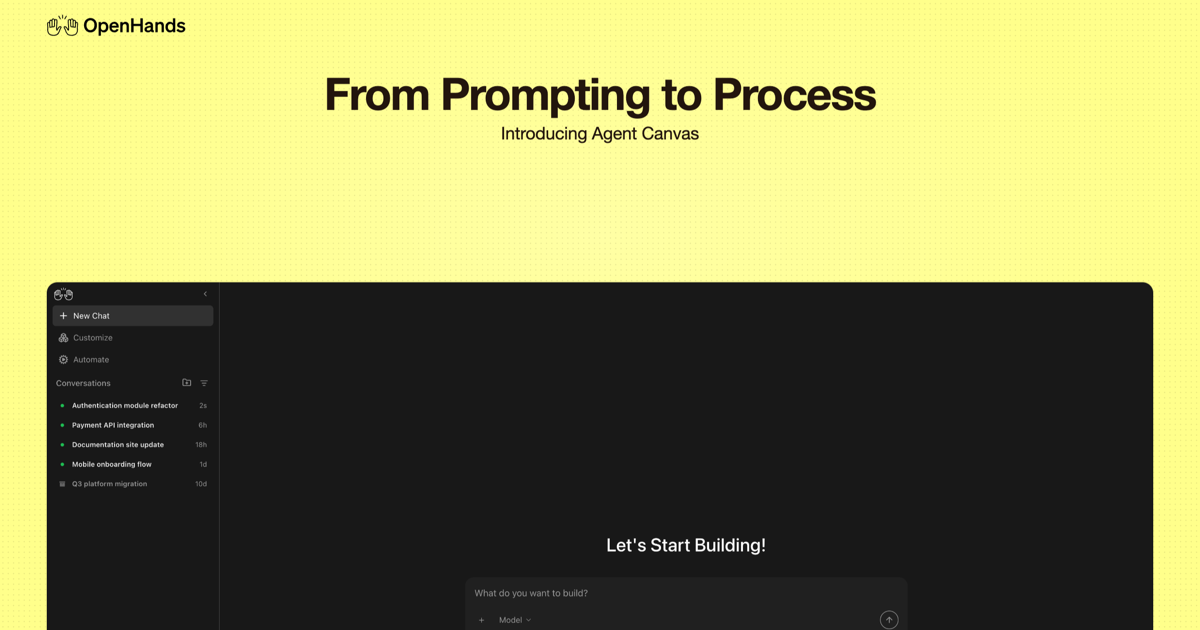
Today, we are introducing Agent Canvas, the new interface for OpenHands.
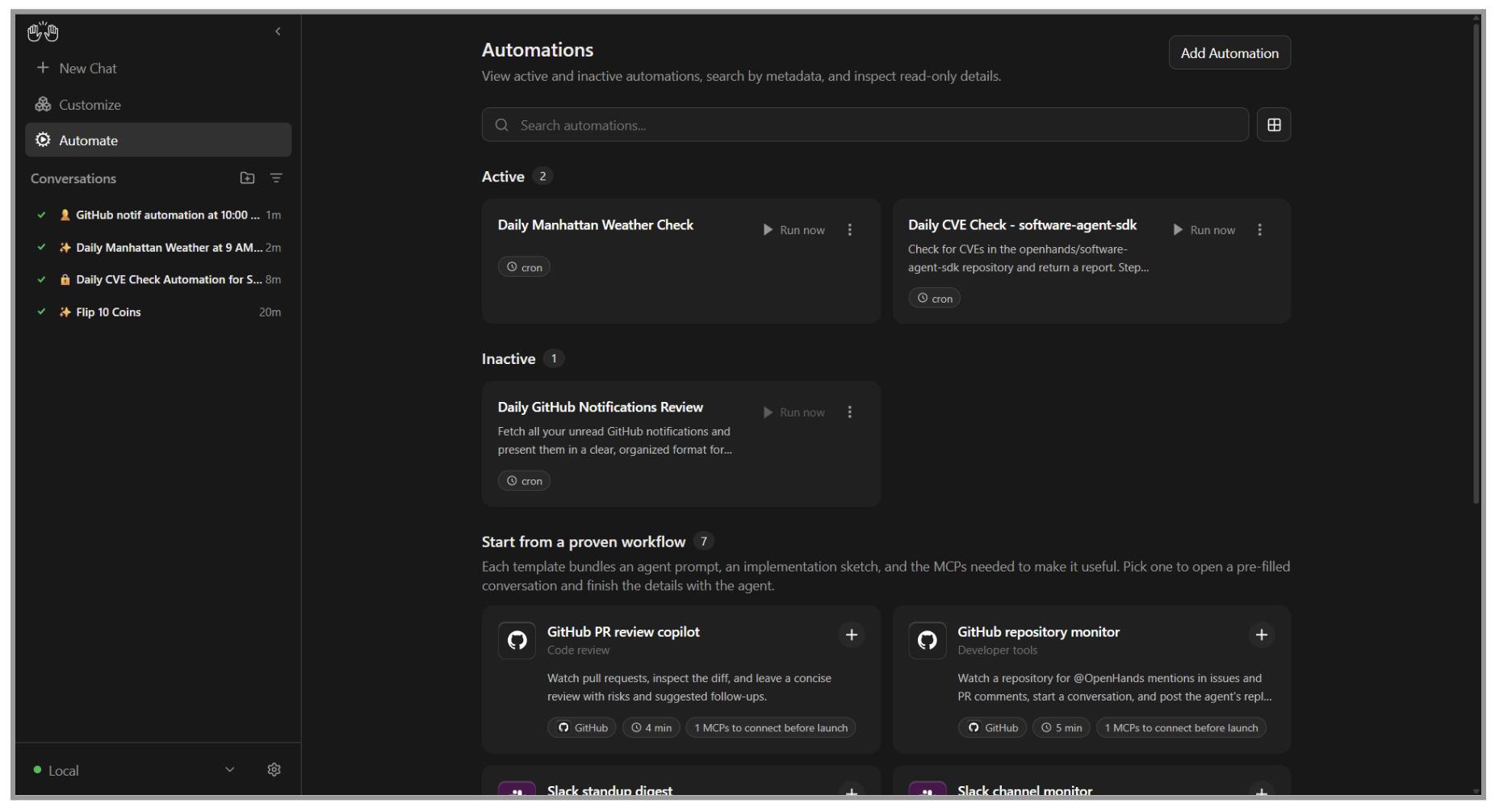
Agent Canvas gives developers and agent builders one workspace to self-host, run, and automate AI coding agents. You can start locally on your laptop, then move to a VM to keep your agents always-on. Connect the tools you already use, run multiple agent sessions, and create automations that trigger from real engineering events.
For this first release, we’re focused on a simple but powerful starting point: Install Agent Canvas and set up an automation that helps you respond to messages in Slack or GitHub, automates code review on PRs, or triages new issues in Linear.

Schedule agent workflows from your own environment
The fastest way to understand Agent Canvas is to create your first scheduled automation. Instead of manually starting the same agent task every time, Agent Canvas lets you define a workflow once and run it on a schedule. Start locally on your laptop, move it to a VM when you want it to keep running, or connect to OpenHands Cloud or Enterprise when your team needs shared infrastructure and stronger controls.
You can use scheduled automations for everyday engineering tasks like:
-
Generating a weekly repo summary
-
Reviewing stale issues every morning
-
Checking for dependency updates every Monday
-
Creating recurring PR summaries
-
Running test generation for changed modules
-
Checking docs drift before a release
-
Sweeping repos for common migration tasks
-
Producing reports that publish into Slack
With Agent Canvas your coding agent no longer has to live inside a terminal session you manually start and monitor. It can become a workflow that runs when you need it.
Why we built Agent Canvas
Over the last few months, we've noticed a shift. Developers are increasingly moving from ad-hoc, multi-turn conversations to automating their day to day workflows.
We also wanted to rethink the role agents play in software development. Most coding agents are still one-off sessions, but engineering work is full of repeatable tasks: things like dependency updates, PR reviews, generating release notes, unblocking CI, fixing breaking API changes, and resolving vulnerabilities. The goal is not just to make coding agents more powerful. It is to make them practical, composable, and genuinely usable in developers' everyday workflows.
At the same time, we've heard from the OpenHands community that developers want more flexibility in how they run and self-host agents to meet a variety of unique scenarios.
-
Enabling more flexible self-hosting scenarios, like deploying agents on remote VMs
-
Better support for local development workflows, including dockerless install options
-
A desire to have agents react to events in third-party tools, like GitHub, Slack, and Jira
Agent Canvas is our answer to that shift.
First, it creates an automation-centric experience. Coding agents are useful in a terminal, but the bigger unlock is turning repeated work into workflows: dependency updates, repo reports, docs checks, issue sweeps, and recurring maintenance tasks. Agent Canvas brings automations into the core OpenHands experience so developers can schedule and manage agent workflows from one place.
Second, it gives developers more control over where agents run. Agent Canvas is built as a frontend that can connect to multiple agent backends, from a local setup to Docker containers, remote VMs, Kubernetes clusters, or enterprise virtual private clouds. That gives developers a path from local experimentation to more persistent, self-hosted, or cloud-based execution.
Third, it supports the agents and tools developers already use. Agent Canvas runs the OpenHands agent out of the box, but it is designed to support third-party harnesses like Claude Code and Codex through the Agent Client Protocol. It also gives teams a path to connect agent workflows into tools like GitHub, Slack, Jira, and Linear as those workflows mature.
That is why Agent Canvas is becoming the main interface for OpenHands. It gives developers one place to run, inspect, automate, and scale agents without being locked into one backend, one model, or one agent harness.
Built for long-running agents across models and compute
As agents move from short prompts to longer-running engineering work, model choice starts to matter more.
A lightweight task like triaging a Slack request or summarizing a GitHub issue may not need the same model as a complex debugging session, architectural change, or multi-step refactor. Some workflows need speed and low cost. Others need deeper reasoning, higher accuracy, more memory, or more control over where execution happens.
That is why OpenHands is built to be model-agnostic, agent-agnostic, and deployable in your environment. Agent Canvas introduces LLM Profiles, so developers can switch models mid-conversation or configure automations to use lower-cost models for straightforward tasks. That matters when agents are running in the background on a schedule, because not every workflow should default to the most expensive model.
This is also where our work with ecosystem partners reflects what we see across the market: long-running agents will run across heterogeneous AI stacks. Developers need the flexibility to choose the right model and compute environment for each workflow.
NVIDIA's Nemotron models are designed for the kind of work agents actually do at scale: planning, tool use, multi-step reasoning, and iteration across long workflows. OpenHands supports this at the agent harness layer, giving developers a way to connect the right model to the right task. NVIDIA accelerated computing gives developers access to the lowest cost per token compute to power their OpenHands agentic workflows including the NVIDIA Vera Rubin rack-scale platform, NVIDIA Blackwell-based systems, and NVIDIA RTX Spark AI PCs.
"OpenHands is making long-running agent workflows practical for developers. NVIDIA Nemotron gives enterprises an open model foundation they can trust, customize, and specialize for their own tools, policies, and domains. And because Nemotron runs across NVIDIA accelerated computing, from local AI to cloud infrastructure, organizations can deploy in environments that meet their security, scale, and governance requirements."
Joey Conway, Senior Director of AI Software at NVIDIA
AMD complements that model-choice story with flexibility in where agent workflows run. Agent Canvas gives developers a control center for building self-hostable coding-agent automations, and AMD provides practical paths to run those workflows on AMD compute, from AMD Instinct GPUs in the cloud to local AI development systems like AMD Ryzen AI Halo. AMD recently published a technical guide for deploying OpenHands on AMD Instinct GPUs with Qwen3-Coder and vLLM, and developers can get started with $100 in AMD Developer Cloud credits through the AMD AI Developer Program.
"AMD is excited to work with OpenHands to help developers run open-source LLMs and agentic workflows on AMD compute, from AMD Instinct GPUs in the cloud to local AI development systems like AMD Ryzen AI Halo. Builders can benefit from more choice in where their agents run and how they scale."
Nick Ni, Sr Director, AI Group at AMD
The future of agentic development will not be one model or one compute environment doing everything. Agent Canvas is the workspace for building across that stack, and OpenHands is the open agent layer for running workflows across the models, agents, and infrastructure developers choose.
Local-first, not local-only
Agent Canvas is built around the simple idea that developers should be able to start locally but have the flexibility to run agents anywhere.
You can run Agent Canvas on your laptop and use it as your personal agent workspace. You can connect it to a VM if you want agents to keep running without depending on local hardware. You can connect to OpenHands Cloud for managed, always-on execution and easier integrations. And when your organization needs governance, auditability, access controls, and cost management, the same journey leads into OpenHands Enterprise and the Agent Control Plane.
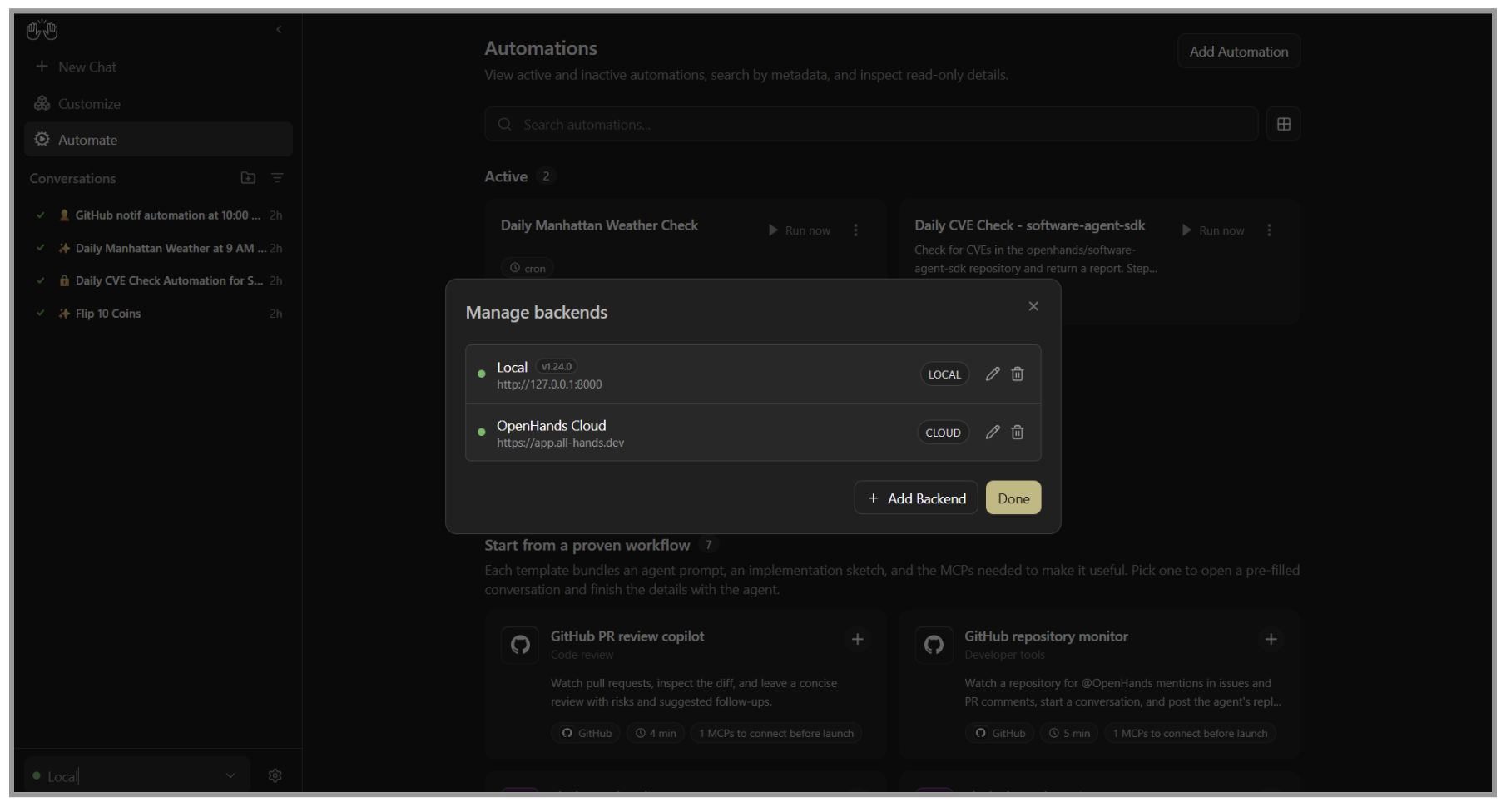
That flexibility also extends to the infrastructure developers already use. With Modal, developers can deploy the OpenHands Agent Server as a remote backend for Agent Canvas, creating a personal cloud sandbox for AI-assisted coding. With ngrok, Agent Canvas can securely connect to the internet, enabling remote access and event-driven automations from tools like Slack, GitHub, and Linear wherever your agents are running.
This gives developers a practical path:
-
Start locally with Agent Canvas
-
Connect Slack and GitHub
-
Build your first agent automation
-
Move useful workflows to a VM or cloud backend
-
Share workflows with your team
-
Scale with enterprise controls when needed
Built for agent builders
Agent Canvas is not a closed coding assistant. It is part of the open-source OpenHands platform. That matters because many developers don't just want to prompt agents. They want to build with them, customize them, and adapt them to their own workflows.
With OpenHands, agent builders can fork the codebase, create custom interfaces, embed the OpenHands SDK into their own products or internal platforms, and avoid being locked into a single model provider's SDK. OpenHands is MIT licensed, so teams can modify, extend, and distribute what they build.
Agent Canvas becomes the interface layer for that work. It gives builders a place to experiment locally, inspect behavior, connect agents to real tools, and turn useful patterns into reusable workflows.
You can start with a Slack bot. Extend it into a GitHub workflow. Move it to a VM. Share it with your team. Build your own interface around it. Or embed OpenHands directly into an internal platform or product.
Agent Canvas gives developers a starting point, but OpenHands gives builders the foundation to make it their own.
Open Source is the point
Agent Canvas is part of the open-source OpenHands platform because agent infrastructure should not be a black box.
If agents are going to run real engineering work, developers should be able to inspect how they operate, modify how they behave, and decide where they run. OpenHands gives builders that control: fork the interface, embed the SDK, bring your own model or agent harness, and self-host workflows in the environment that fits your stack.
Open source is not just how OpenHands is distributed. It is how we make agent workflows transparent, extensible, and controlled by the teams running them.
Adopt OpenHands Enterprise when you're ready
Agent Canvas is where many developers will start. OpenHands Enterprise is where organizations go when agent usage needs to scale across teams. A local scheduled automation is a great first workflow for one developer, one repo, or one team. But as adoption grows, teams need more:
-
Shared access to workflows
-
Always-on cloud execution
-
Centralized management
-
Identity and access controls
-
Sandboxed execution
-
Audit logs
-
Usage visibility
-
Cost guardrails
-
Self-hosted deployment options
That is the role of the OpenHands Agent Control Plane. Agent Canvas gives developers a local-first way to build and run agent workflows. OpenHands Enterprise gives organizations the infrastructure to scale those workflows safely across teams, repositories, and environments.
The journey starts with a developer getting something useful running locally. It grows when that workflow becomes valuable enough to share. And it scales when the organization needs control over how agents run, what they access, what they change, and how much they cost.
Start building with Agent Canvas
AI coding agents are moving from experiments to everyday engineering tools. The next step is making them easier to run, easier to automate, and easier to scale. Agent Canvas gives developers that starting point. Install it locally. Connect Slack and GitHub. Start your first OpenHands conversation from where work already happens.
Agent Canvas is designed to make the first workflow simple. To get started:
-
Add your LLM key, or use Agent Canvas with an existing harness like Claude Code or Codex
-
Setup a pre-built automation, like a Slack channel monitor or GitHub PR review assistant
-
Watch OpenHands respond to automation triggers or schedules
Start with something small like a Slack-triggered agent conversation, a GitHub issue investigation, or a pull request summary. Once that workflow is useful, you can keep refining it, move it to a more persistent backend, or share it with your team.
Agent Canvas is the first step toward running coding agents as real engineering workflows, not just one-off sessions. When you are ready to move beyond your laptop, OpenHands Cloud and Enterprise give you the path to always-on execution, team workflows, and the control plane needed to run agents across your organization.
Join our community to collaborate, share use cases, and contribute to the project as it evolves. When you're ready to bring structure, security, and scale to production, OpenHands Enterprise gives your team the control plane needed to run agents confidently across your organization. Download it, try it, break it, and build with it. And when it's time to scale, we're here to help.
Running on AMD hardware? Check out the technical guide to deploy OpenHands on AMD compute, whether that's in the cloud or locally. Running on NVIDIA infrastructure? OpenHands works with Nemotron models to run capable, reliable agent workflows.
About OpenHands
OpenHands is the open-source platform for building and running AI coding agents, with the interface, automations, and control layer needed to go from a single local agent to a system running across an entire organization. The mission is to make agent-based software development accessible, transparent, and controllable by default. That starts in the open. The core framework is open source, giving developers and platform teams full visibility into how agents execute work and interact with their systems. The project has over 77,000 GitHub stars, millions of downloads, and contributions from hundreds of developers. OpenHands is used by engineers at large enterprises and fast-growing startups to build, run, and scale AI coding agents across real software engineering workflows. The long-term vision is to become the full stack AI coding agent platform for software engineering. Not just helping developers write code, but running meaningful parts of the software lifecycle.


Get useful insights in our blog
Insights and updates from the OpenHands team
Sign up for our newsletter for updates, events, and community insights.
OpenHands is the foundation for secure, transparent, model-agnostic coding agents - empowering every software team to build faster with full control.



