OpenHands in August: A Clearer Way to Run, Review, and Automate Agentic Work

Written by
Devin Vinson
Published on
Eight Agent Canvas releases made agentic work easier to follow, safer to configure, and simpler to turn into repeatable workflows—culminating in Canvas Apps Beta, live automation-run phases, and new controls for providers, agents, and skills.
Agentic development rarely stays inside a chat window. Useful work stretches across files, commands, context, credentials, model choices, reviews, and recurring workflows.
This month, we focused on making OpenHands Agent Canvas a better home for that entire process. Across eight releases (from v1.9.0 through v1.16.0) we made agents easier to follow, automations easier to discover and operate, model configuration safer, and agent output easier to review. We also introduced a new way to extend the workspace with trusted custom pages.
The thread connecting the month is simple: Agent Canvas is becoming the everyday workspace where you can run agentic work in the right environment, understand what happened, review the outcome, and reuse the workflow when it works.
Stay oriented while agents work
The best agent experience should not ask you to stare at a spinner and guess what is happening.
An updated agent activity indicator now shows when an agent is reading files, running commands, or working through a task—even when it is not streaming a response. Failed messages have clearer retry and dismiss actions, while structured error outcomes help distinguish a recoverable configuration problem from an internal failure.
For developers running larger agent workflows, we also added practical controls
-
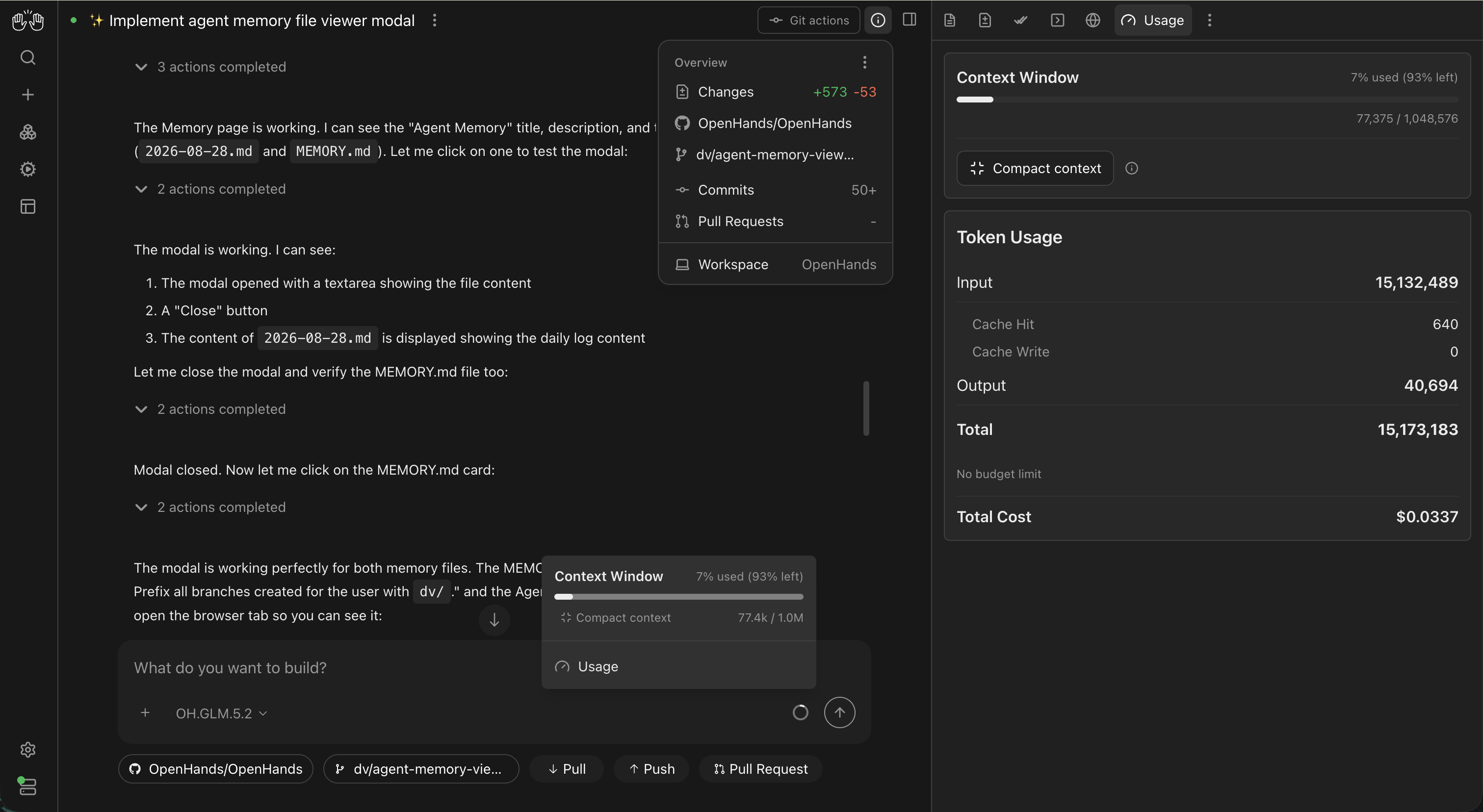
See context, tokens, and cost as a conversation grows. The context meter and usage drawer help you understand how much room remains, compare model behavior, and avoid running out of context mid-task. When supported, you can compact the conversation yourself.
-
Archive conversations without deleting them. Clear the sidebar when work is done for now while keeping past conversations available when you need them.
-
Launch separate child conversations from a parent task. Developers building manager-style workflows can delegate work into full Agent Canvas conversations, including Cloud-backed sandboxes and worktrees where configured.
-
Keep project context close to the conversation. The overview panel brings the workspace, Git state, pull requests, and changes into a single minimal card view.
Fast models should also feel fast in the interface. August’s streaming improvements reduced unnecessary state updates while preserving the rendered response, helping Agent Canvas keep pace as tokens arrive.
Extend Agent Canvas with custom Apps
Released in beta with v1.16.0, Apps introduce a new path to add custom pages and integrated browser tools to Agent Canvas. Teams can now build the tools and workflows they already rely on directly into Agent Canvas without forking or modifying the core application.
An App can add dashboards, project tools, or other browser-based interface to OpenHands Agent Canvas and make authenticated HTTP requests to the active Agent Server. Apps are managed per backend and are currently available with supported local or remote Agent Server backends.
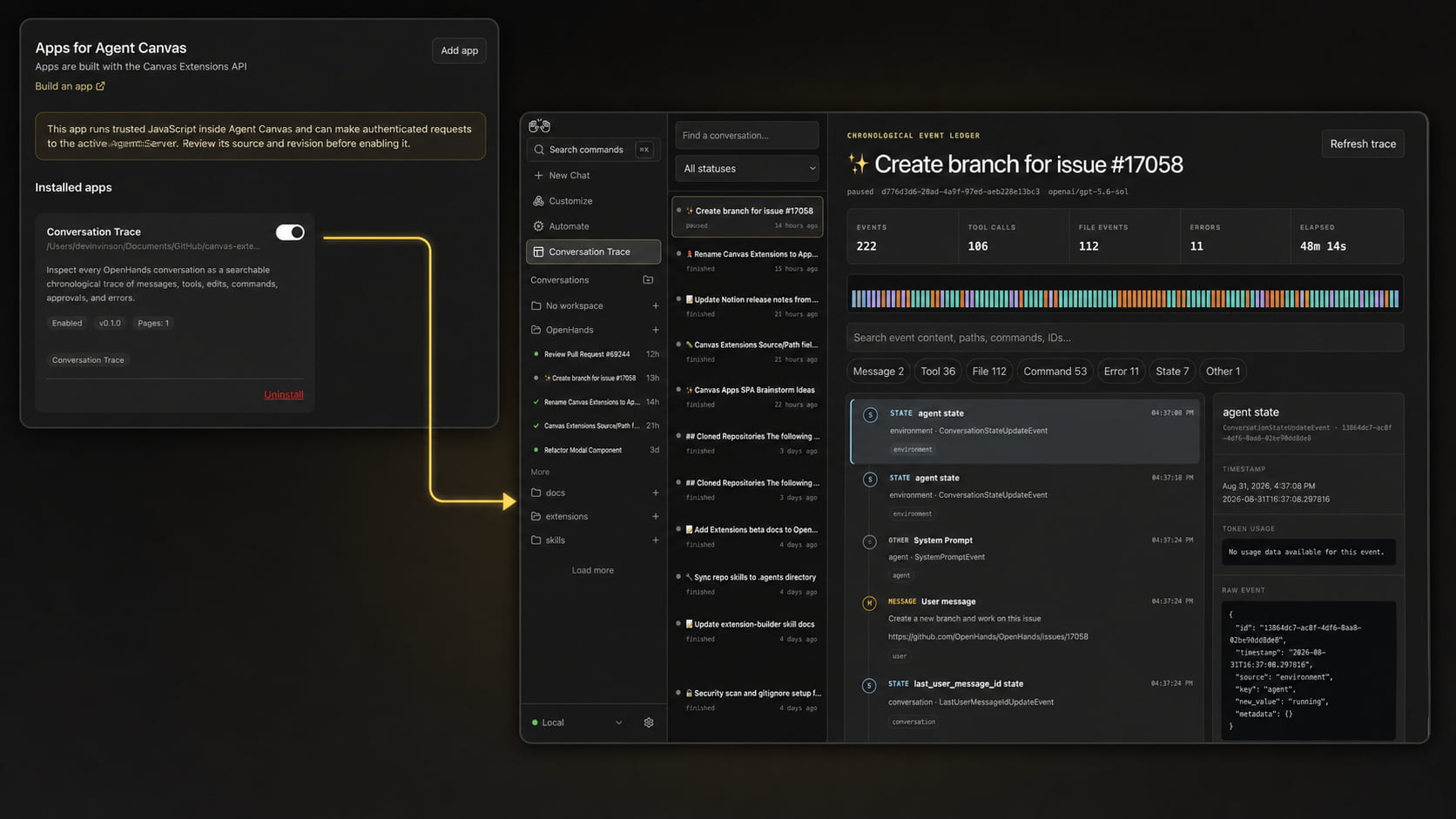
The experience is deliberately review-first. New Apps are installed as disabled so you can inspect the source, resolved revision, manifest, and contributed pages before enabling them and accepting the trusted-code.
That trust boundary matters. Enabled apps run JavaScript in the same browser context as Agent Canvas and are not isolated in an iframe or worker. Only enable code you trust. The initial beta focuses on custom pages; the API, and supported extension points may evolve as the feature develops.
For teams with internal tools or contributors exploring new product surfaces, Canvas Apps create a practical path to bring those interfaces into the workspace while keeping the core Agent Canvas application upgradeable.
Turn repeated work into reliable automations
Agent Canvas is moving beyond one-off agent sessions toward work that can run repeatedly, on a schedule or trigger, without someone prompting an agent every time.
OpenHands has supported pre-built workflows such as Slackbots, pull-request review, and issue-to-PR automations. August made those workflows easier to discover, configure, understand, and operate as a first-class part of Agent Canvas.
Recommended automations can now define the fields a user needs to provide, such as a repository or other workflow-specific configuration. Instead of beginning with a general setup conversation every time, you can fill in a set of form fields to configure an automation. An agent conversation can still be the starting point but the form-first experience removes unnecessary interaction when using the prebuilt automations.
Getting started with automating got easier and more reliable:
-
Discover useful starting points. A recommended rail on the new-conversation page surfaces practical automation templates before you have to know exactly what to search for.
-
See what is happening now. Automation cards, Home, and the Activity Log display a live
PENDING,RUNNING, orFAILEDphase. Those phases are also included in CSV and JSON exports. -
Understand activity over time. The dashboard brings run activity, failures, durations, details, and recent trends into one operational view.
-
Track costs over time. Per-run LLM cost helps teams understand how prompts, context, and reasoning affect automation spend.
-
Review before enabling. Imported automations show their name, trigger, prompt, and plugins before they can be turned on.
-
Keep workflows portable. Automation Git Sync mirrors automation definitions to a private Git repository so teams can review changes over time and bring their workflows to another OpenHands installation.
Recommended automations can also install script bundles alongside their configuration. That lets deterministic code handle jobs such as polling, deduplication, state management, and fixed API calls while the agent focuses on the parts that require judgment. The result is easier to reason about, less wasteful, and better matched to the job than treating every scheduled task as an open-ended conversation.
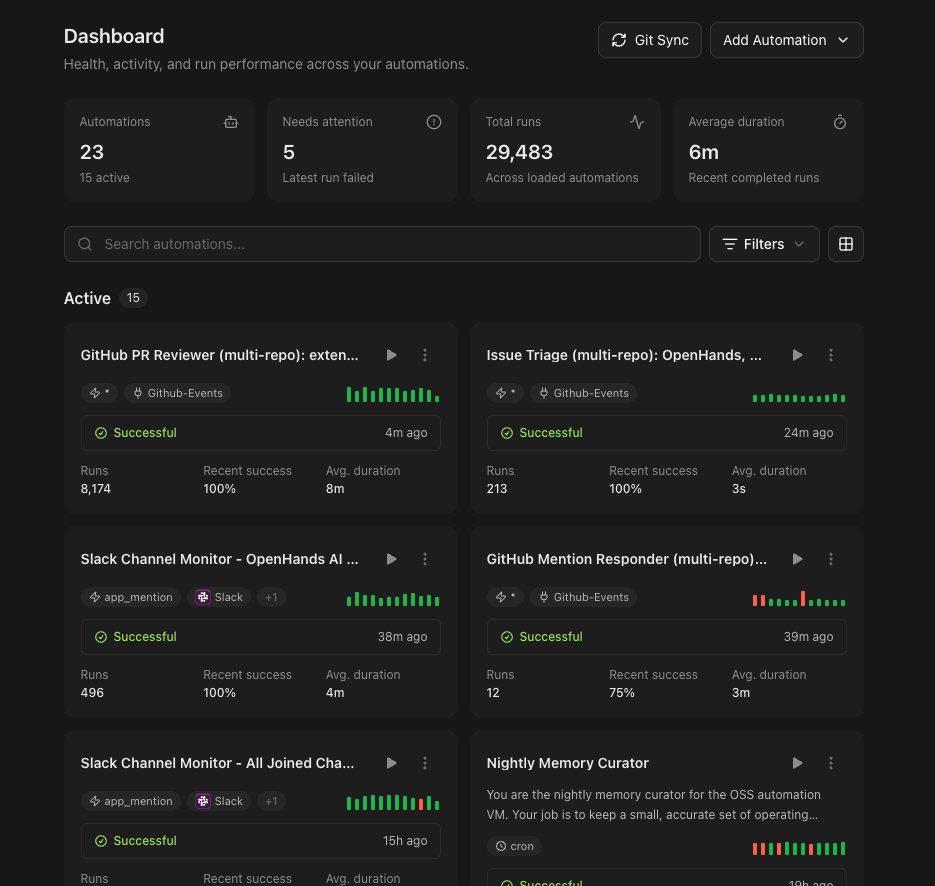
Together, these changes support a growing range of repeatable jobs: code review, issue-to-PR workflows, maintaining an AGENTS.md file, daily news digests, Slack standups, Linear issue triage, Jira-to-GitHub handoffs, and workflows built around automating your software development lifecycle.
Keep model choice flexible and configuration predictable
OpenHands is model-agnostic, so teams can choose the providers and models that fit each task and environment.
August made that flexibility easier to manage:
-
See free model access at a glance. Multiple models were available with free usage during the month, with new
Freelabels showing when promotions were active. -
Catch setup issues before they interrupt work. LLM profiles now validate credentials and model availability before saving, helping prevent failed conversations later.
-
Reuse provider credentials across profiles. New Provider Connections store a provider key and optional base URL once, let multiple LLM profiles share it, and make key rotation easier. Linked profiles also show when a connection is missing.
-
Control whether agents can change models. The Let the agent switch LLM profiles setting gives you explicit control over access to the switching tool.
The result: more model choice, with clearer configuration and fewer surprises.
Review the work, not only the response
When an agent writes code or creates an artifact, the answer is not only in the conversation. It is in the files and changes the agent produces.
August made those outcomes easier to inspect. Markdown files render as rich previews directly in the conversation, with a one-click link to open in the Files drawer. All other files mentioned in chat are now also clickable and open the relevant location in the Files panel.
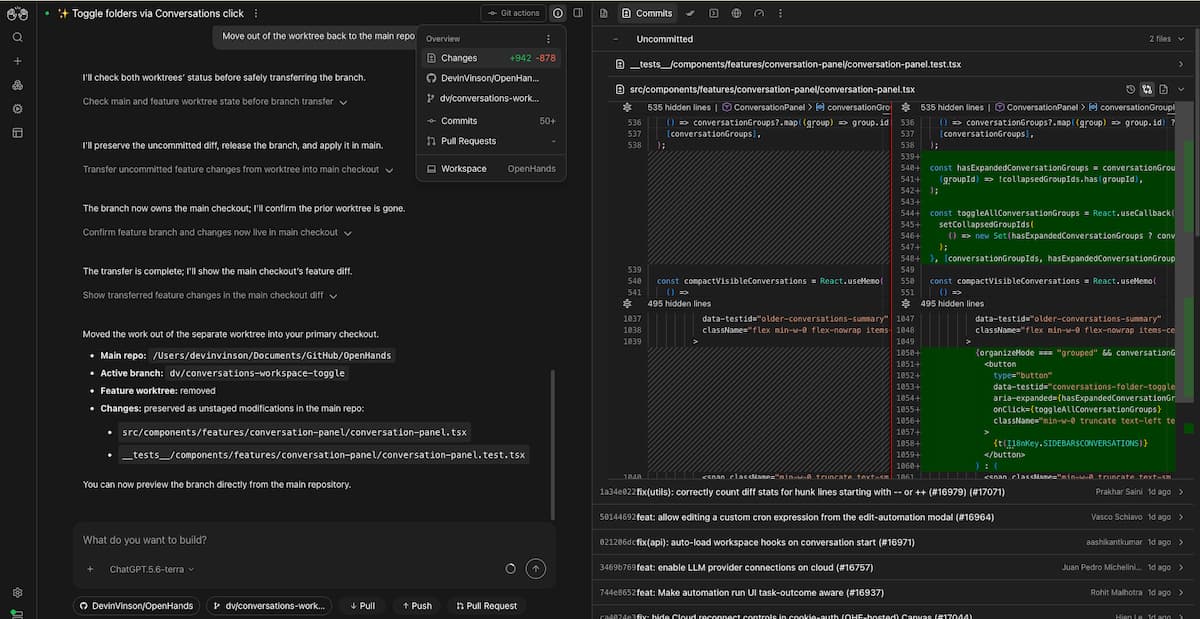
The unified Commits drawer brings version control and easier commit inspection closer to the conversation. Combined with the overview panel, you can move from an agent’s explanation to the workspace, Git state, and reviewable change set without losing the thread of the task.
That creates a more natural review loop: follow the agent’s activity, inspect the artifact, find where it lives, review the changes, and decide what should happen next.
Additional August Updates
-
Introduced a Getting Started checklist to help with onboarding.
-
Improved touch behavior for mobile on the go coding, skill management for larger catalogs, better backend-scoped conversation links, profile safety, PDF previews, workspace navigation, conversation performance, and the reliability of local and self-hosted setups.
-
Expanded the desktop app builds to bundle the required runtimes, so users can get started without installing prerequisites or keeping a terminal open. Desktop Apps are still in early preview but now support Linux in addition to Windows and macOS.
Built with our community
OpenHands moves this quickly because the product is built in the open with our open source community. Across the eight August releases, 47 community contributors landed 168 merged pull requests spanning new features, fixes, performance improvements, documentation, and maintenance. Thank you to everyone who contributed code, filed issues, tested builds, reviewed changes, and helped make Agent Canvas more useful and reliable.
Want to help shape what comes next? Join the OpenHands community, contribute on GitHub, and help us build the future of open agentic software development.
Try the August releases
Agent Canvas is becoming the open workspace for agentic work: A place to run agents, understand and review what they do, and turn successful work into repeatable automations.
August moved that experience forward across automations, model configuration, review workflows, and extensibility. Check out the release notes for more details.
Install or update Agent Canvas and try it with a real project. Then explore the daily workflow guide to see Agent Canvas, GitHub, Slack, MCP, and automations working together or Learn how to build a Canvas App for your own trusted tools and interfaces.

Get useful insights in our blog
Insights and updates from the OpenHands team
Sign up for our newsletter for updates, events, and community insights.
OpenHands is the foundation for secure, transparent, model-agnostic coding agents - empowering every software team to build faster with full control.



