Controlling any Coding Agent with the OpenHands Agent Canvas and SDK
Written by
OpenHands Team
Published on
There are now a huge variety of coding agents that developers can choose from. These include Claude Code, Codex, or the Gemini CLI which are popular due to their close integration with Anthropic and OpenAI language models and discounted subscription plans. And they also include model-agnostic agents like OpenHands and OpenCode, which make it possible to switch between models or even host your own. Each of these agent harnesses have their own benefits, and it’s common for developers to pick and choose based on the types of tasks they do most frequently and the level of accuracy the agent achieves on those tasks.
Separately from the underlying agent harness, there’s also a question of how you interact with the agent. Typically developers do this through a command-line interface (CLI), all of the agents mentioned above have their own CLI, and possibly other tooling around the agent like a GUI or a cloud version, etc. So when you switch between using Claude Code and OpenHands or vice-versa, you needed to learn a whole new set of interfaces together with their quirks.
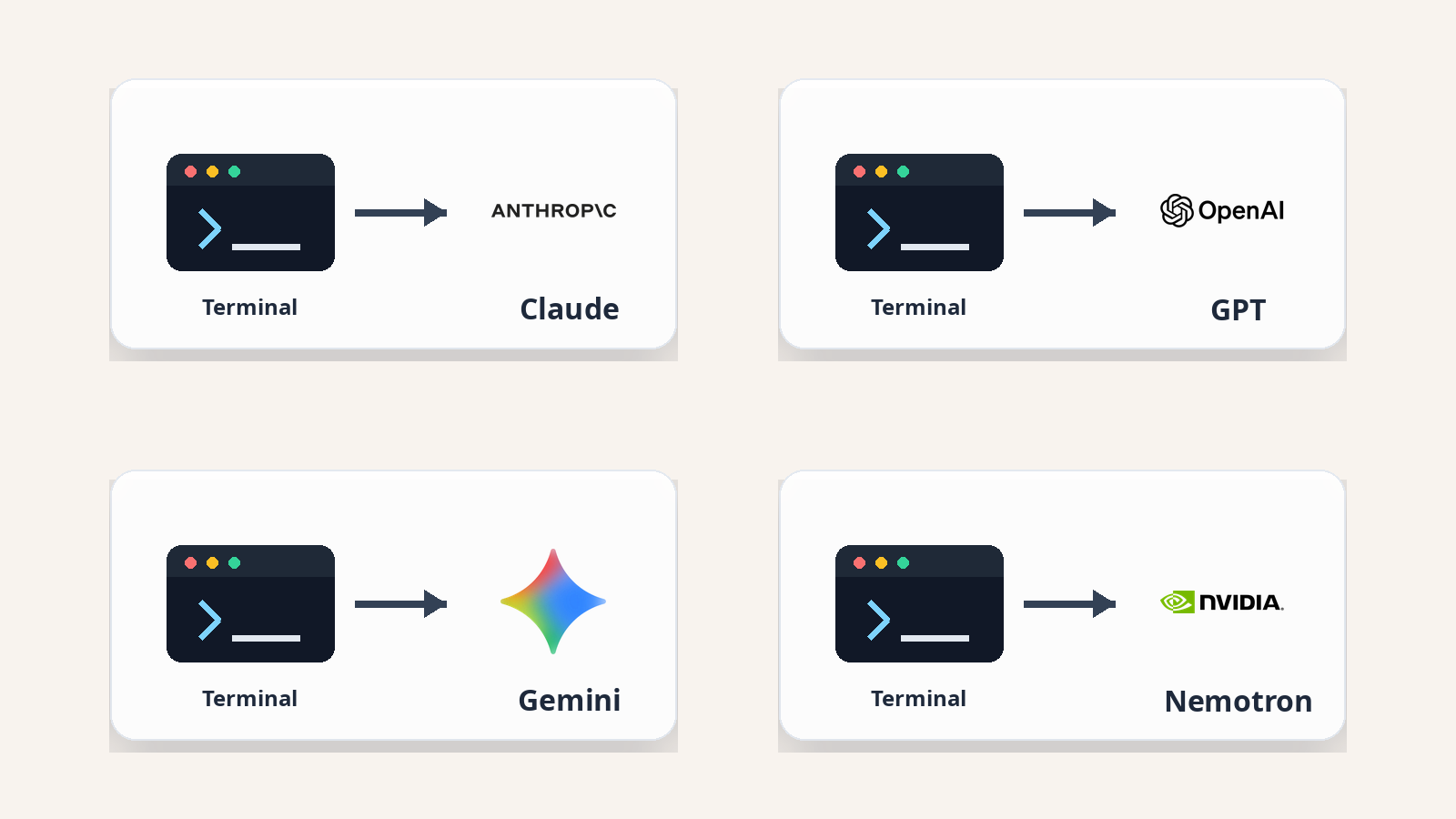
To remedy this problem, we recently released new functionality in the OpenHands Agent Canvas and OpenHands Software Agent SDK, which makes it possible to effortlessly switch between agents, using the ones that are most appropriate for your task. Let’s dig in to how it works.
The Agent Client Protocol
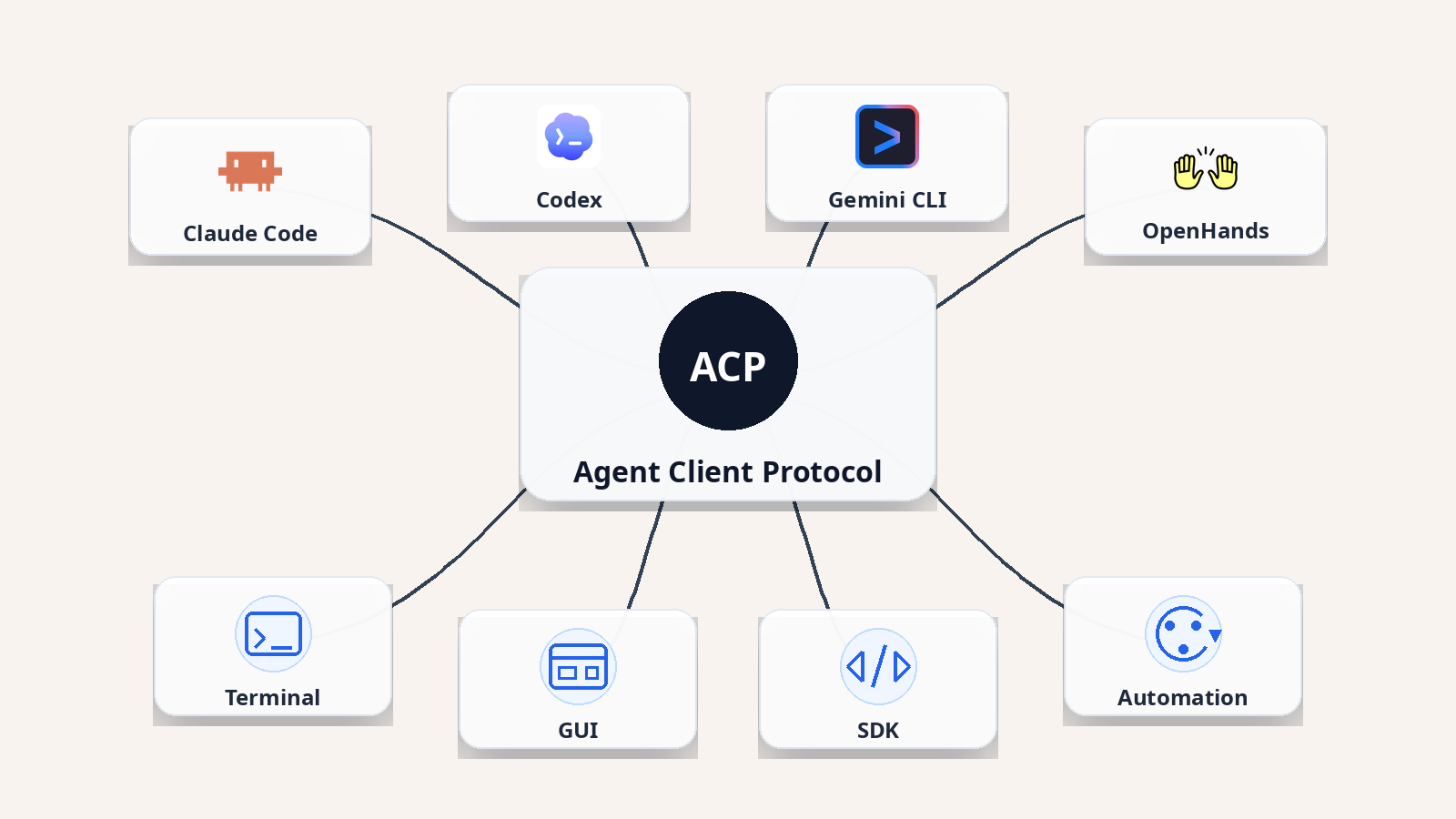
OpenHands makes this possible through the Agent Client Protocol (ACP), an open protocol for communication between coding agents and the clients that host them. This means that in place of the standard tight integration between agents and clients (like a CLI or IDE editor), every new agent-editor pairing usually needs custom integration work, ACP uses a standardized interface so agents and clients can evolve independently.
For instance, when the OpenHands Agent Canvas (a client) connects with a downstream agent like Codex or Claude Code, it will send standard ACP calls using JSON-RPC 2.0. A typical session looks like this:
-
The client initializes the connection, creates or resumes a session, and sends a user prompt.
-
The agent streams updates back to the client, requests permissions when needed, performs tool or file operations through supported client capabilities, and eventually returns a turn result.
For developers, the important part is not the transport detail of course. It is the product experience: the editor, canvas, or SDK can become a stable surface while the underlying agent is swappable as long as it supports the ACP protocol.
How to Use Any Agent Anywhere in the OpenHands Agent Canvas
Agent Canvas is the browser-based OpenHands UI and backend for running agent conversations and automations. It has several important features worth noting here:
-
As mentioned above, it is agent agnostic, so you can use it with any agent
-
It also allows you to seamlessly set up an agent backend to run anywhere, so you can have one backend running on your local machine and another running on a remote server, or spin up cloud sessions on the OpenHands Cloud
-
It has rich automations, so you can run agents on a schedule to perform code review, do dependency upgrades, update documentation, etc.
You can install and run it with npm:
npm install -g @openhands/agent-canvas
agent-canvas
By default, Agent Canvas starts at http://localhost:8000. On first launch, the setup wizard walks through four steps, one of which is choosing your agent as you can see below:
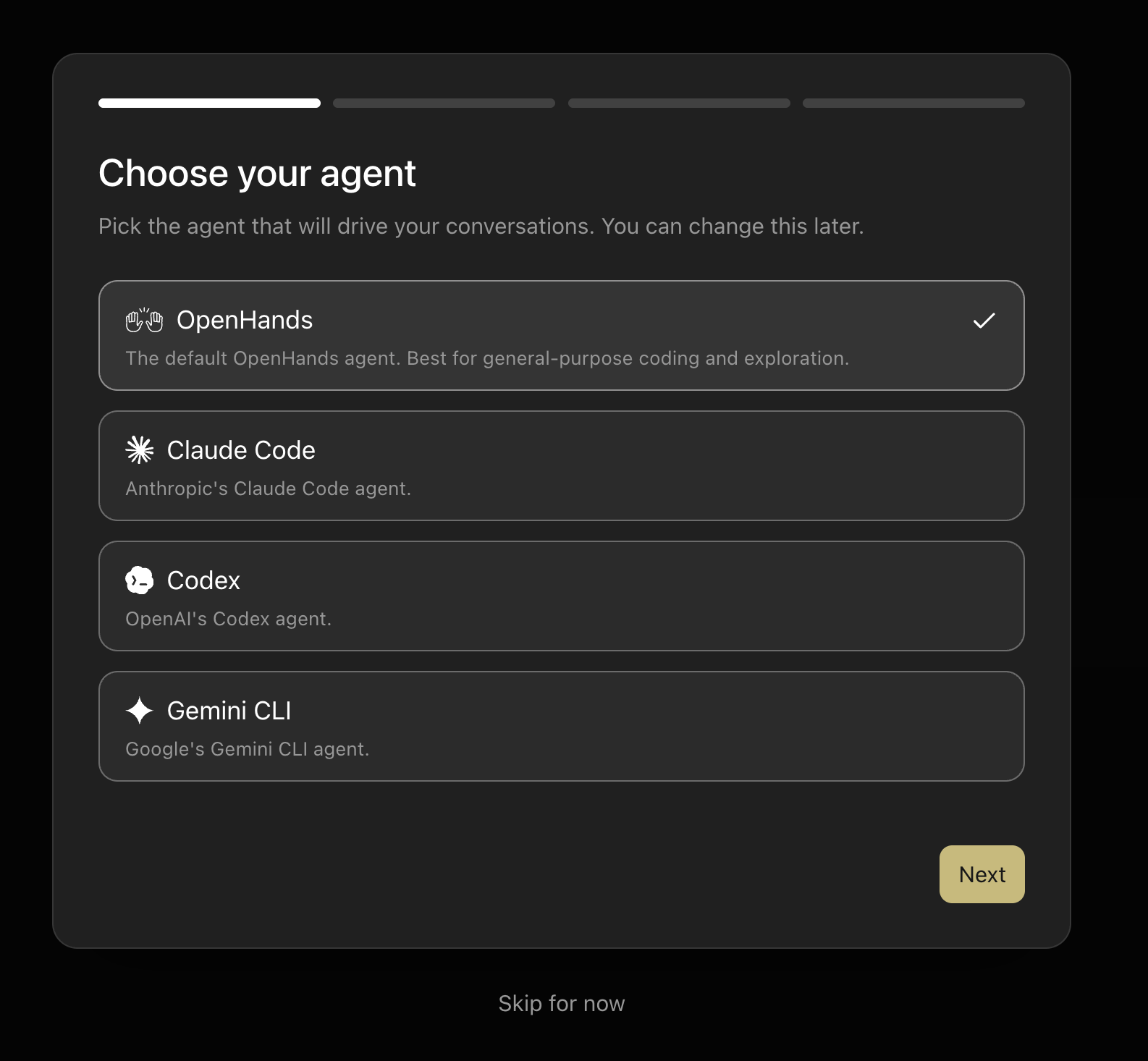
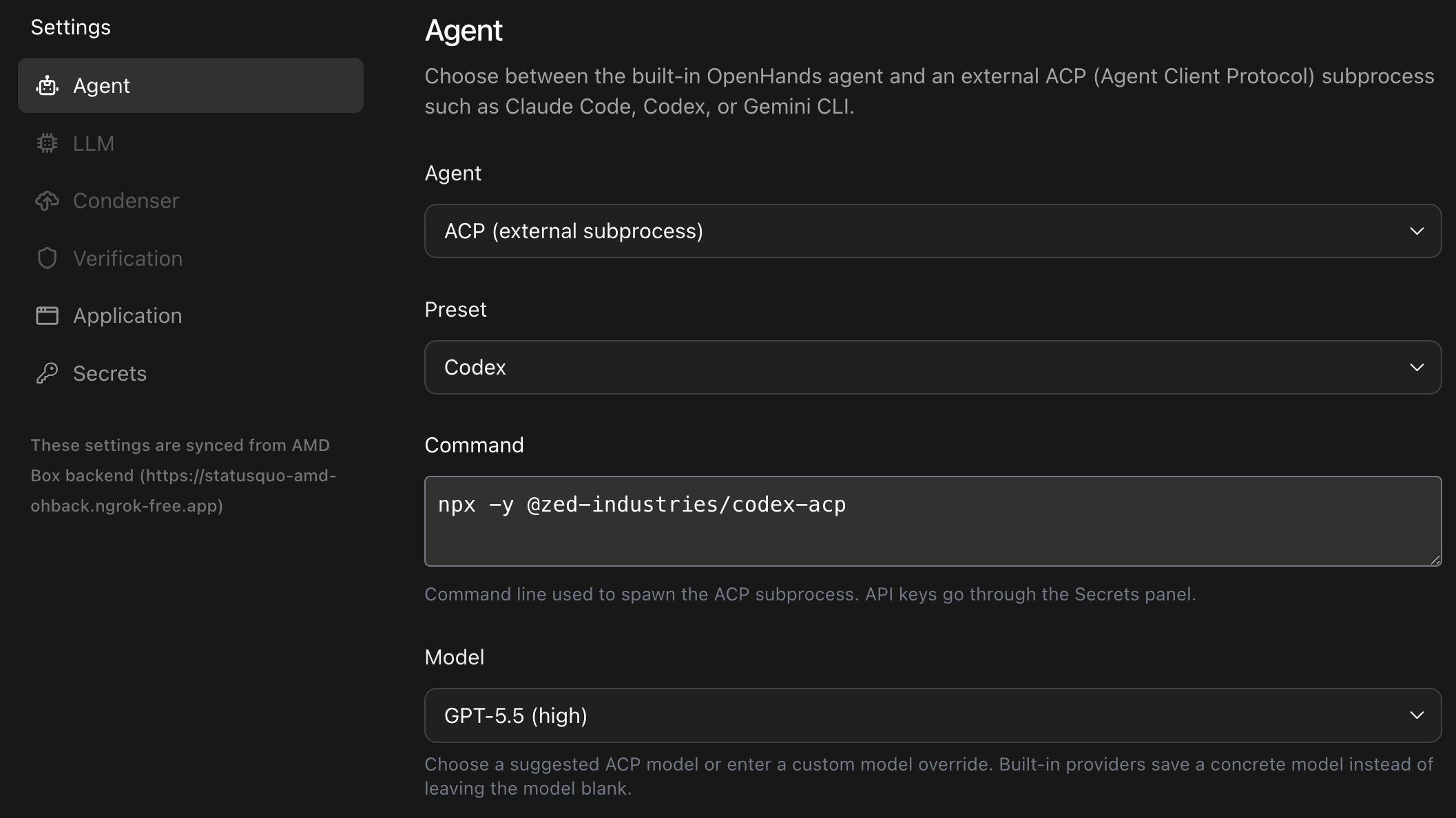
This then allows you to choose exactly which settings you use to boot up your agent, including whether you want to use your subscription plan or API key, etc. You can switch agents later from Settings -> Agent. The choice is saved per backend, and new conversations use the updated agent.
How to Use Any Agent in the OpenHands Agent SDK
ACP support is also available in the OpenHands Software Agent SDK. The OpenHands SDK is appropriate for power users who want to implement their own complex workflows with coding agents powering them in the background. The SDK's ACPAgent lets a Python application delegate conversation turns to any ACP-compatible server instead of calling an LLM directly.
The core idea is simple: your SDK app sends messages, while the ACP server owns its own LLM calls, tools, context management, and execution behavior.
from openhands.sdk.agent import ACPAgent
from openhands.sdk.conversation import Conversation

agent = ACPAgent(
    acp_command=["npx", "-y", "@agentclientprotocol/claude-agent-acp"]
)

try:
    conversation = Conversation(agent=agent, workspace="./my-project")
    conversation.send_message("Explain the architecture of this project.")
    conversation.run()
finally:
    agent.close()
ACPAgent also supports extensions such as skills, repository context, and other features through an AgentContext object. These are rendered into the prompt before it reaches the ACP server. You can find the full example here.
Use Your Existing Subscription Plan on OpenHands Cloud
One practical benefit of ACP support is that you are not limited to paying per-token API costs. Because ACPAgent delegates execution to a locally-running ACP server, it authenticates using whatever credentials that agent already has, including your existing subscription plan.
This means if you already pay for Claude Max, Codex Pro, or the Gemini Advanced plan, you can point the OpenHands SDK or Agent Canvas at that agent and let your subscription cover the inference cost, rather than burning separate API credits.
This becomes especially powerful when combined with OpenHands Cloud. OpenHands Cloud can spin up a managed backend that runs the ACP agent server for you, so you get the orchestration, persistence, and automation features of OpenHands without needing to keep your laptop open. Your subscription plan's authentication is injected at session start, and the agent runs remotely until the task is complete.
A typical setup looks like this:
-
Connect to OpenHands Cloud from Agent Canvas (or the SDK).
-
In Settings → Agent, choose your preferred agent and authenticate with your subscription credentials.
-
Start a conversation or trigger an automation—the cloud backend handles the rest.
The net result is that the same Claude Code subscription you already use in your terminal can now power a scheduled automation that runs code review every night, without any extra billing.
A concrete example of this in action is the OpenHands pr-review GitHub Action. By default it runs the standard OpenHands agent and requires an LLM API key. But with a two-line change — agent-kind: acp and an acp-command, it delegates to any ACP-compatible agent, using that agent's own authentication. If you already have a Claude Max or Codex Pro subscription, you can run automated PR review on every pull request in your repo with no API billing at all:
- uses: OpenHands/extensions/plugins/pr-review@main with: agent-kind: acp acp-command: npx -y @agentclientprotocol/claude-agent-acp github-token: ${{ secrets.GITHUB_TOKEN }}
Comparing Agent Accuracy
Once multiple agents can run behind a common interface, the next question is practical: which agents should be used for which tasks? There are a number of reasons why you might choose a particular agent, such as familiarity with how the agent works, having built up agent-specific tools or workflows, or having a subscription plan that allows you to use an agent in a particular way. But another major consideration is accuracy.
Previously, we introduced the OpenHands Index leaderboard as a way to compare the accuracy of different large language models (LLMs) across five benchmark categories:
-
Bug fixing: SWE-Bench
-
Frontend development: SWE-Bench Multimodal
-
App creation: Commit0
-
Test generation: SWT-Bench
-
Information gathering: GAIA
But up until now, we evaluated all LLMs within a single agent harness, OpenHands. Now, with ACP support, we can run the same benchmark over the combination of agent harness and language model, so I can answer the question of “when I use Anthropic’s Opus 4.7 model, should I run it using OpenHands or Claude Code?” We have posted the results on the OpenHands Index alternative-agents leaderboard:
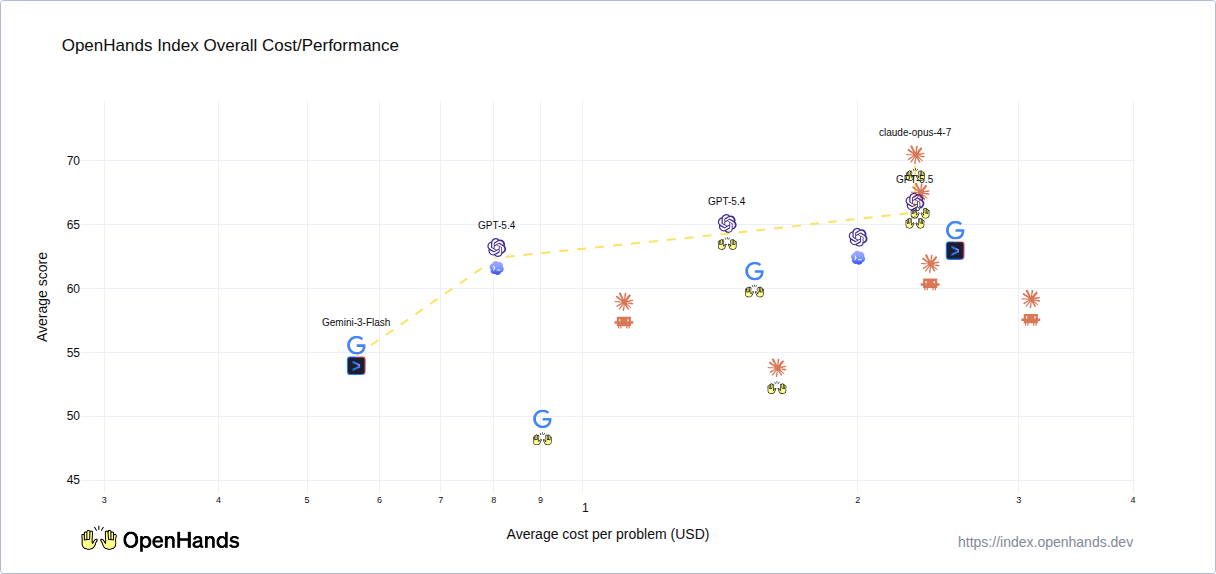
To summarize some findings:
-
When using Anthropic models, OpenHands achieved better accuracy at lower cost than Claude Code (when using API pricing)
-
When using OpenAI models, OpenHands achieved higher performance than Codex, although at somewhat higher cost
-
When using Gemini models, the Gemini CLI tended to outperform OpenHands somewhat, although the cost was significantly higher (we are looking into the reasons!)
We are planning on continuing this benchmarking to give a holistic view of which harnesses work best with which models, and we’d welcome any further suggestions!
Try it Out!
If this piqued your interest, we’d suggest that you start out by downloading the Agent Canvas and trying it out:
npm install -g @openhands/agent-canvas
agent-canvas
You can spin up a conversation with different agents and compare them, and then try to create an automation that runs your favorite agent as an automated code review bot, for instance.
And if you try it out and have any feedback, join the OpenHands community on Slack or feel free to contact us at any time!


Get useful insights in our blog
Insights and updates from the OpenHands team
Sign up for our newsletter for updates, events, and community insights.
OpenHands is the foundation for secure, transparent, model-agnostic coding agents - empowering every software team to build faster with full control.



