Simple, In-conversation Model Choice in OpenHands
Written by
OpenHands Team
Published on
There is no single best language model for every software engineering task.
Some tasks call for the strongest reasoning model you can get: planning a risky migration, debugging a subtle production issue, or reviewing a large pull request. Other tasks are better served by a faster or lower-cost model: routine implementation, repetitive code changes, first-pass exploration, or high-volume workflows where cost and latency matter as much as raw capability. And people are noticing this more and more, as OpenAI CTO Greg Brockman said recently, “the model alone is no longer just the product”.
OpenHands has always been designed as an LM-agnostic coding agent, and we extensively test it to make sure it performs well with many LMs on the OpenHands Index. The next step is making model choice easy enough to use in the middle of real work.
Today we are introducing a broader model-choice workflow in OpenHands: saved LLM profiles, in-chat model switching, and SDK-level primitives for routing, fallback, and cost tracking. We are also happy to announce that we have partnered with MiniMax around this launch, so we can provide free access to MiniMax M2.7 for a limited time on the OpenHands Cloud.
See our video below or read on for more!
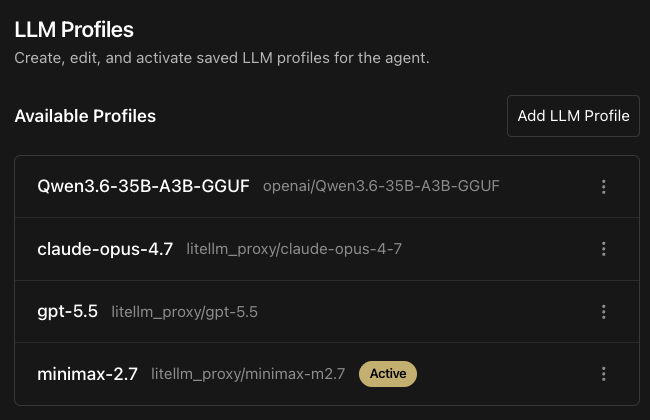
Save the models you actually use
Until now, changing models usually meant re-entering a model ID, base URL, API key, and related settings. That is fine for a one-off experiment, but it breaks down if you regularly move between models.
LLM profiles let you save named configurations once and reuse them later. A profile can represent a frontier model for planning, a lower-cost model for implementation, a self-hosted endpoint, or a provider-specific setup with a custom base URL.
In practice, a team might keep profiles like:
-
planning-opusfor hard design and review work. -
implementation-minimaxfor lower-cost implementation loops. -
debugging-gptfor tricky failures and test investigation. -
private-vllmfor a self-hosted model running inside their own environment.
This helps specify a reusable configuration that can be activated consistently across OpenHands workflows.
The /model Command
Model choice is most useful when it can happen at the moment you need it. OpenHands now supports switching a running conversation to a saved profile from the chat flow.
Typing /model lists your saved profiles inline. Typing /model <name> switches the active conversation to that profile and records the switch in the conversation.
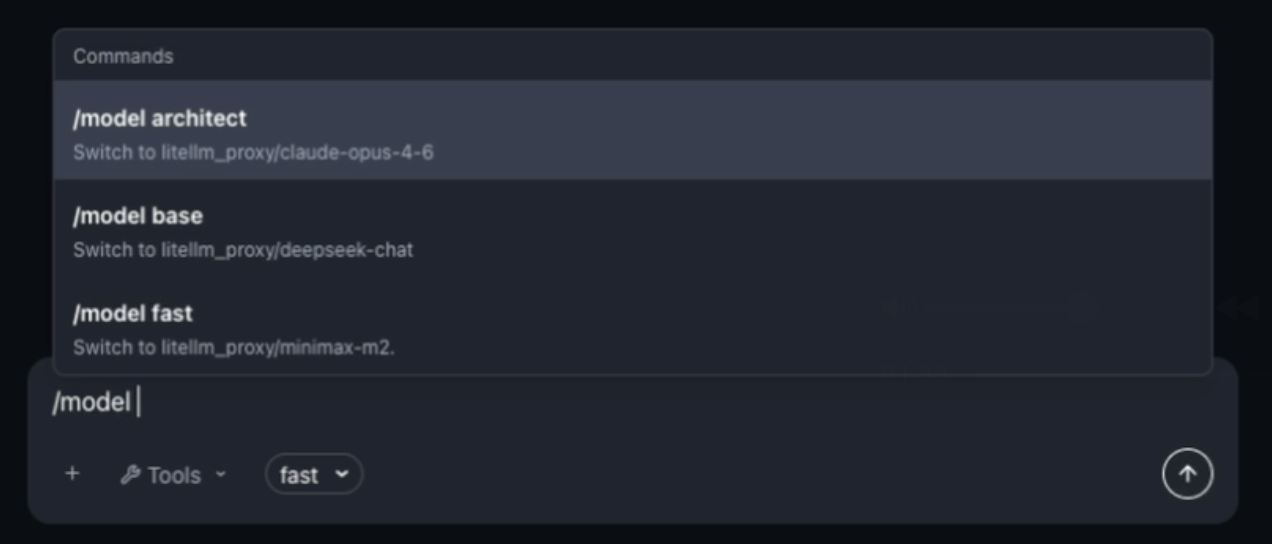
This makes mixed-model workflows much easier. For example:
-
Start with a strong but expensive reasoning model to inspect the repository and write a plan.
-
Switch to MiniMax M2.7 for the implementation loop.
-
Switch back for final review, test failure analysis, or a risky refactor.
Agent-driven Model Choice
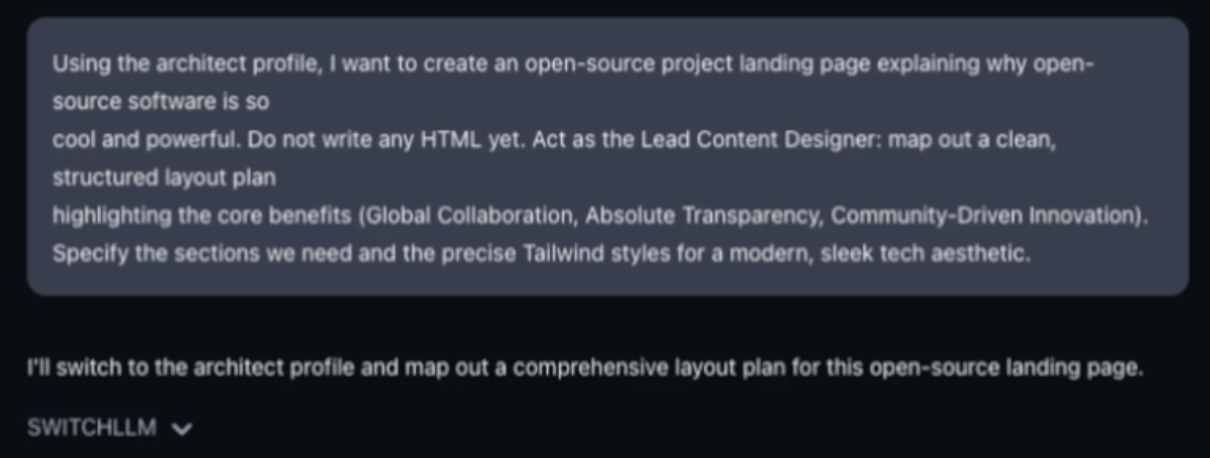
In addition, we added a cool feature where the agent can select its own model! This means that you can provide a prompt that say something like:
“Start out by creating a plan with Claude Opus, do the implementation with Minimax, and then do a code review and any cleanup with gpt-5.5.”
And the agent will automatically switch up the language model at the appropriate time.
MiniMax-M2.7 Free for a Limited Time
A major reason to make model choice easier is cost. Coding agents can run for many steps, call tools repeatedly, and operate across large repositories. The difference between models can become significant when teams start using agents for more than occasional one-off tasks.
MiniMax M2.7 is a strong option for the cost-performance tradeoff. It is nearly 10x cheaper than other alternatives, and punches above well above its weight for the price, being one of the competitive models on our OpenHands Index benchmark. Because of this we’re happy to partner with MiniMax to provide it for free to OpenHands Cloud users to try out for a limited time!
Try it Out!
This feature is now available in the OpenHands Cloud, Agent Canvas, and the Software Agent SDK. If you are experimenting with MiniMax M2.7 or building your own model-routing workflows, we would like to hear what works, what fails, and what data would help you choose models more confidently.
Join us in the OpenHands community, try model profiles in your workflow, and tell us which models you want to see next.


Get useful insights in our blog
Insights and updates from the OpenHands team
Sign up for our newsletter for updates, events, and community insights.
OpenHands is the foundation for secure, transparent, model-agnostic coding agents - empowering every software team to build faster with full control.



