Stop Choosing Coding Models by Hand
Written by
Juan Michellini
Published on
There is no single best language model for software engineering, and the treadmill of keeping up with them is real work.
Every few weeks a new model ships, and a version bump is not a guarantee of an upgrade. Claude Sonnet 4.5 was great; Sonnet 4.6 turned out to be better at some things and worse at others. What people say about a new model on launch day is often contradicted by the data a week later. Meanwhile, every time you start a task you are implicitly making a purchasing decision: run this on the cheap model that will probably do fine, or on the expensive one that definitely will?
We built the Model Router in Agent Canvas so you can stop making that decision by hand.
What is the Model Router?
A Model Router is a special kind of LLM profile. Instead of pinning a conversation to one model, it looks at the task you just typed and routes it to the model that fits: a strong reasoning model for a risky refactor, a cheap one for routine work, a multimodal one when there are screenshots involved.
OpenHands ships two ready-made routers, plus a blank template:
-
OpenHands Router Pro optimizes for the best score, reaching near-top accuracy without paying top-model prices on every task.
-
OpenHands Router Flash optimizes for cost, while still beating most single models on both axes at once.
-
Custom gives you an empty router to point at your own models and your own rules.
Notice that a router is not a black box. Each one is composed of a prompt template, a model table, and a classifier model (a small, cheap model; we use MiniMax-M3) that reads the task, applies the template's rules, and picks from the table. You can open all three in Settings > LLM and edit them. If you would prefer to route task to some other model, you can change it.
How this is different from what's already out there
Model routing is not a new idea, so it's worth being precise about what we built and why.
The market has settled into two patterns. The first is the AI gateway — OpenRouter, Vercel AI Gateway, LiteLLM. These are unified APIs that aggregate providers and route between providers of the same model for availability, cost, and latency. They are excellent infrastructure, but they do not pick the right model for the task; they pick the right provider for a model you already chose. The routing decision "should this be a cheap model or a strong one?" is still yours to make by hand.
The second is the standalone router product: a service that sits in front of your models and classifies prompts into tiers. Several well-funded companies built this exact thing over the last two years. Two of the most prominent have since pivoted away from it entirely, and the best-known open-source version (RouteLLM) is a two-year-old research artifact that routes between exactly two models using chat-preference data. That is not a criticism of any of them; it is evidence that bolting a router onto the outside of an agent is a hard product to sustain, because the routing decision only knows what the user typed, not what the agent is about to do with it.
The OpenHands Model Router is built differently, in three ways:
- It lives inside the agent loop, not in front of it. Because the router is part of Agent Canvas, it is exposed to the agent as a tool. The agent can call it per step inside a plan. For example: plan with a strong model, write tests with a cheap one, do the actual fix with a different one. No gateway sees that level of detail, because no gateway is in the loop.
Notice that we don’t route on every request. A gateway that routes each request in isolation is cache-blind, and the cache-miss cost can eat the savings the cheaper model was supposed to deliver. Independent measurements are stark: within a single turn, around 90% of an agent's prompt can be served from cache; cross a turn boundary on the same model and that drops to 55%; switch models and it drops to 8% (citing a Microsoft Azure Research study of 13.5M Copilot sessions). The same author found cache-blind routing on a frontier model cost 4.88x more than the cache-aware baseline, and concluded that "routing is not just a pricing decision — it is a state-management decision, and the harness is where that state lives." That is the case for routing inside the harness, not in front of it.
-
It is trained on real agentic work. The routing rules came out of a prompt-optimization search over five coding-agent benchmarks. That means the classifier has seen what actually happens when you hand a task to a coding agent, not what humans prefer in a side-by-side chat comparison.
-
It is transparent and editable. The router is a prompt template and a model table you can read and change, not a hosted classifier you have to trust. If a route is wrong, you can see why and fix it.
Where the routing rules come from
The rules inside those prompt templates came out of a training process, and the data that fed it is public.
We started from the OpenHands Index benchmark suite, which measures models on real agentic work across five different task types: fixing issues in large repos (swe-bench), writing tests (swt-bench), answering questions that require tool use (GAIA), working from screenshots (swe-bench multimodal), and building projects from scratch (commit0).
For the router experiments we ran 12 current models over 1,084 benchmark instances, kept only rows with reliable, non-null cost data, and split everything into training, validation, and a held-out test set. Then we used an automated prompt-optimization loop (GEPA) to search for routing rules that push the cost/quality frontier outward. The search starts from hand-written seed prompts and keeps whatever the data supports. We checked the results against the held-out split to make sure they generalized instead of overfitting.
The evidence
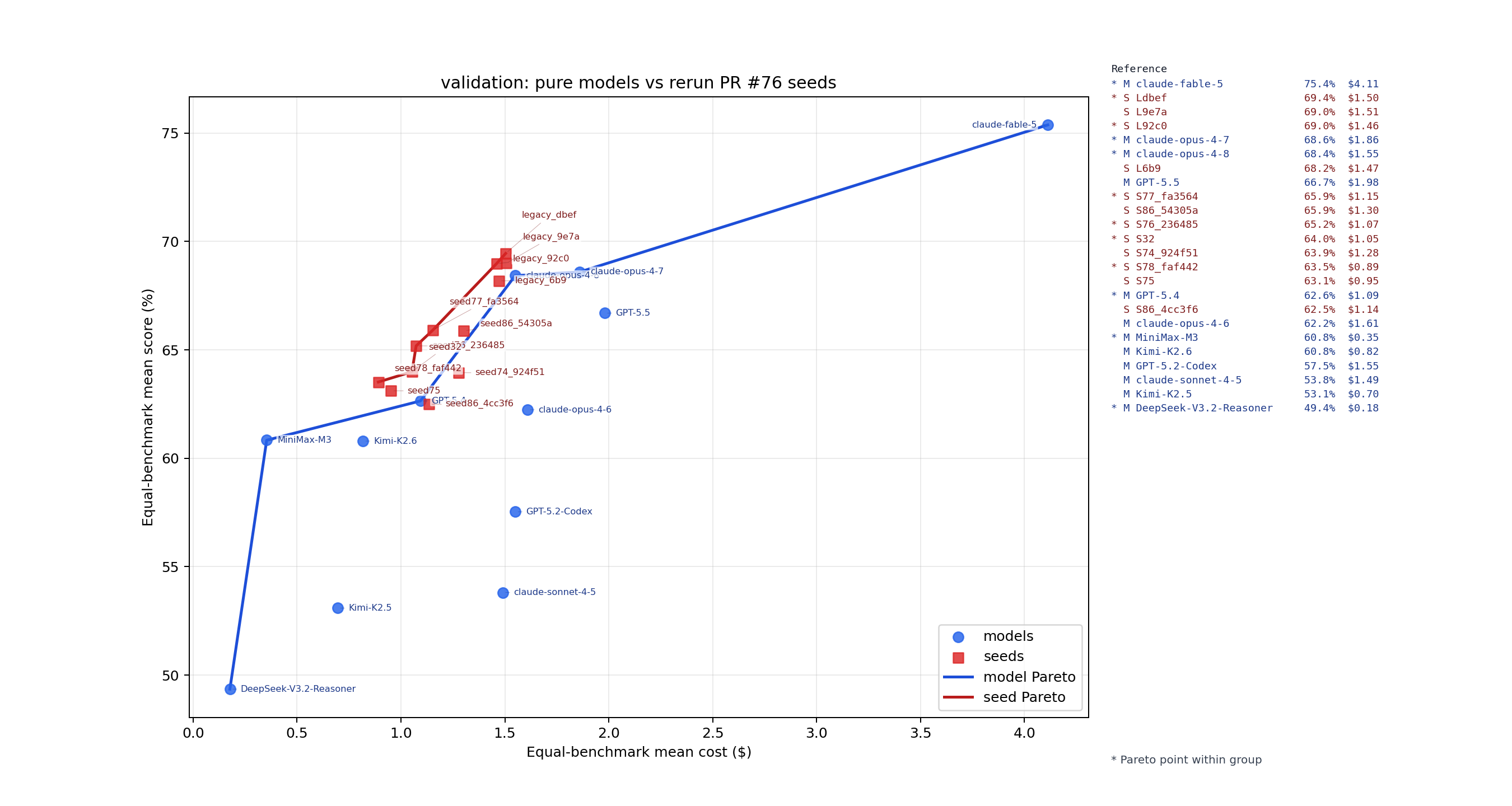
Here is what the frontier looks like on our validation split (359 held-out instances, average cost per task across all five benchmarks):
| Configuration | Avg. score | Avg. cost per task |
|---|---|---|
| claude-fable-5 (best single model) | 75.4 | $4.11 |
| claude-opus-4-7 | 68.6 | $1.86 |
| claude-opus-4-8 | 68.4 | $1.55 |
| Router Pro | 69.4 | $1.50 |
| claude-opus-4-6 | 62.2 | $1.61 |
| GPT-5.4 | 62.6 | $1.09 |
| Router Flash | 63.5 | $0.89 |
| MiniMax-M3 | 60.8 | $0.35 |
| claude-sonnet-4-5 | 53.8 | $1.49 |
Two things stand out:
-
Router Pro edges Claude Opus 4.8 on both axes at once, with a slightly higher score at slightly lower cost, by sending only the tasks that need a big model to a big model.
-
Router Flash, at $0.89 per task, scores higher than GPT-5.4, Claude Opus 4.6, and Claude Sonnet 4.5 while costing less than all of them. No single model occupies that point on the frontier. Individual models are dots; routing connects them into a curve you can actually pick a point on.
Why does per-task routing pay off so much? Because the spread between "good deal" and "bad deal" flips by task type. MiniMax-M3 writes tests almost as well as models six times its price (81% on swt-bench at $0.11 per task) but is a poor choice for greenfield work. DeepSeek-V3.2-Reasoner is nearly free on research-style questions. Claude Fable 5 is the best model on nearly everything, at four to twelve times the cost, which you do not need to pay for a routine test fix. A single-model choice pays that markup on every task, or nothing at all.
Setting it up
-
Open Settings > LLM and select Model Router.
-
Select Add Model Router and choose Router Pro, Router Flash, or Custom.
-
Review the prompt template and the model table, then pick one of your saved LLM connections. The router will add any missing LLM profiles for you.
-
Save the router. The Run on first message toggle makes every new conversation route automatically; it turns itself on when you add your first router.
The model table needs LLM profiles to route to, so the router setup can also create them in bulk from one provider connection: one API key, all the models, instead of pasting credentials a dozen times.
For the full configuration walkthrough, see the Model Router docs.
You stay in control
The router stays under your control:
-
Switch any running conversation to a specific profile with the
/modelcommand. -
The router is exposed to the agent as a tool, so you can ask for per-step routing inside a plan: "call the model router at each step of the plan." Plan with a strong model, write tests with a cheap one, do the actual fix with a different one.
-
Turn off Run on first message and route only when you ask.
-
Open the router in settings and edit the prompt template or model table whenever you want different rules.
The limits
A router routes among the models you give it. It will not conjure Fable-level scores at MiniMax prices. The best single model still wins on raw score if cost is no object, and that is exactly what Router Pro and Flash are for: choosing where on the frontier you want to live.
Two caveats we think are worth stating plainly:
-
These are averages over our benchmark mix. Your tasks, repositories, and token budgets are different; treat the table above as evidence that routing works, and check it against your own bills.
-
Optimizing purely for cost is a good way to buy cheap failures. Flash deliberately trades some score for a 40%+ cost cut, and the router's model table is visible precisely so you can veto a cheap route on the tasks where you disagree.
Try it out
Model Router is available now in Agent Canvas, in Settings > LLM. The full configuration guide is in the docs, and the video above walks through the setup, the training data, and a live routing example.
Check out the demo to learn more and hear what it was like bringing this feature to OpenHands.
If you build a Custom router with your own model table, we would love to see what your frontier looks like. Join the OpenHands community and tell us what works, what fails, and which models you want in the table next.
Get useful insights in our blog
Insights and updates from the OpenHands team
Sign up for our newsletter for updates, events, and community insights.
OpenHands is the foundation for secure, transparent, model-agnostic coding agents - empowering every software team to build faster with full control.


